Incoming Fax Routing Methods: E-mail, Store in Folder, Print, Custom
Fax Voip T.38 Modem implements Fax Voip T.38 Modem Routing Extension that is integrated into the Windows Fax Service. When the fax service receives a fax transmission, it routes the received document through each of the fax routing methods defined by a fax routing extension.
When receiving faxes using Windows Fax service (via Fax Voip Virtual COM Ports), you can configure Incoming Routing Methods to route incoming faxes to recipients on the network. Depending on the Caller Number (Caller ID) and Called Number (DID), different actions can be applied to incoming fax. These actions are defined by the so-called rules. The independent set of rules is used for each method.
The fax routing methods defined by the Fax Voip T.38 Modem Routing Extension are very similar to the fax routing methods defined by the Microsoft Routing Extension (available on any Windows Server computer, such as Windows Server 2025, Windows Server 2022, Windows Server 2019, Windows Server 2016, Windows Server 2012R2 etc.). The essential difference is the possibility to do routing based on Called Number (DID) and without being tied to a specific fax device. This was made possible by implementing the workaround. In addition, Fax Voip T.38 Modem routing methods work not only on Windows Server computers, but also on any workstation, such as Windows 11, Windows 10, Windows 8.1 etc.
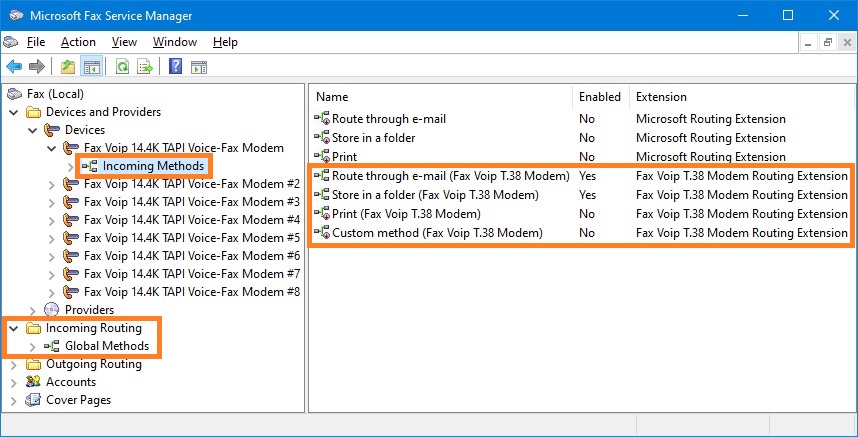
The Fax Voip T.38 Modem Routing Extension includes the following Incoming Routing Methods:
Route through e-mail. Incoming faxes can be delivered via e-mail to one or more e-mail recipients. To, Cc and Bcc e-mail fields can be used. The fax delivery format can be TIFF, PDF or SFF.
Store in a folder. Incoming faxes can be copied to one or more local or network folder. The format for saving incoming faxes can be TIFF, PDF or SFF.
Print. This method allows to automatically print incoming faxes to one or more printers.
Custom. This method allows to easy add any routing functionality by using custom application that is started after receiving a fax. The using of this method is not limited by the current licences.
What kind of license do I need to use this?
The Fax Voip T.38 Modem Virtual COM Ports license is required in any case. The number of rules is specified as the number of ports (modems) plus 1.
The Fax Voip T.38 Modem Extended Fax Routing license (E-mail, Store In Folder, Print) allows you to significantly increase the maximum number of available rules.
Buy now
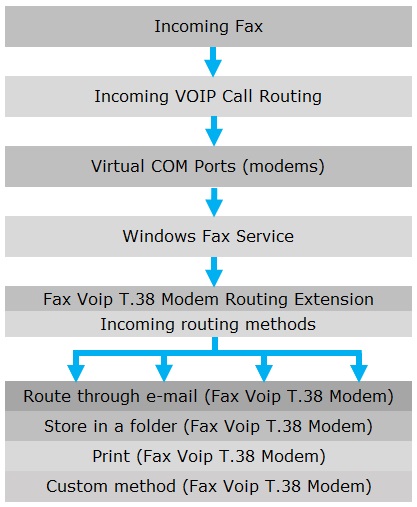
The following diagram provides an overview of the incoming fax routing process:
On Windows Server computer, you can view Fax Voip T.38 Modem Routing Extension fax routing methods in the Microsoft Fax Service Manager, see picture below.